

Section 3.6: Digital and Video Modes #
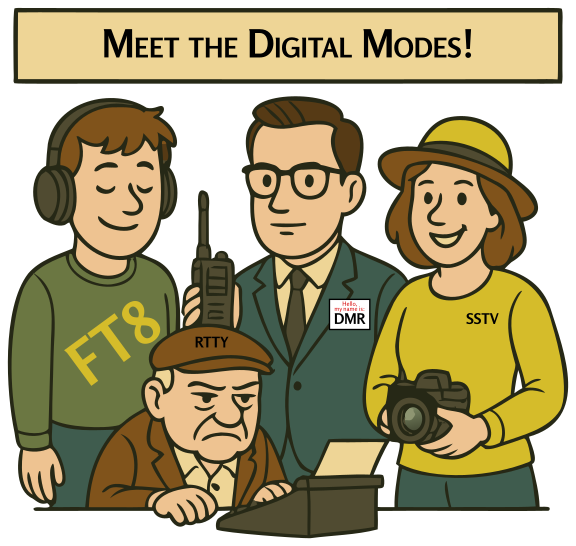
Welcome to the digital age of amateur radio! If voice modes are like having a conversation, digital modes are like sending text messages or emails through the airwaves. And video? You might be surprised to know that it’s been possible to send pictures and even television via Amateur Radio for decades!
Key Information: Digital communications modes include packet radio, IEEE 802.11, and FT8, among others.
Packet Radio #
Key Information: Packet radio includes error detection checksum, destination station call sign, and automatic repeat request.
Imagine sending an email through radio waves. That’s essentially what packet radio does! It breaks your message into small “packets” of data, sends them over the air, and then reassembles them at the receiving end. Each packet includes a checksum for error detection, the call sign of the destination station, and an automatic repeat request if errors are detected.
It’s like sending a puzzle through the air that reassembles itself perfectly on the other side! Packet radio was a big deal in the 1980s and 1990s before the internet became widespread. Today, it’s still used in some applications, especially in emergency communications.
APRS (Automatic Packet Reporting System) #
Key Information:
- APRS can transmit GPS position data, weather data, and text messages.
- APRS provides real-time tactical communications with station location mapping.
APRS lets you transmit GPS position data, weather information, and short text messages while providing real-time tactical digital communications in conjunction with a map showing the locations of stations. It’s like Twitter meets Google Maps, but for radio!
PSK31 #
Key Information: PSK stands for Phase Shift Keying.
PSK (Phase Shift Keying) is ideal for real-time, keyboard-to-keyboard conversations. PSK31 operates at a symbol rate of 31.25 baud, roughly matching typical typing speed. It’s so narrow that contacts can be spaced just 100 Hz apart, allowing many signals to fit where a single voice transmission would.
RTTY (RadioTeletype) #
RTTY is the granddaddy of digital modes, dating back to the 1930s. It’s pretty much a radio-based typewriter. It’s still popular in contests and among some news agencies.
PACTOR #
PACTOR is a versatile digital mode that can automatically switch between speeds and encoding methods based on conditions. There are several versions, with PACTOR III offering robust performance for things like email over radio.
Digital Mobile Radio (DMR) #
Key Information:
- DMR uses time-multiplexing to put two digital voice signals on a single 12.5 kHz repeater channel.
- A DMR color code is an access code which must be programmed into a DMR transmitter to access a specific repeater.
- A talkgroup is an identifier used by DMR to organize radio traffic so that those who want to hear the group aren’t bothered by other radio traffic.
- Join a DMR talkgroup by programming your radio with the group’s ID or code.
- A DMR “code plug” is configuration data loaded onto your radio to access repeaters and talkgroups.
DMR is a powerful digital voice mode that uses time-multiplexing to put two digital voice signals on a single 12.5 kHz repeater channel. This effectively doubles the available channels without using more spectrum.
What makes DMR unique:
- Talkgroups: An identifier used to organize radio traffic so users who want to hear the group aren’t bothered by other traffic. Join by programming your radio with the group’s ID or code.
- Color Codes: An access code that must be programmed into your radio to access a specific repeater.
- Code Plugs: Configuration data loaded onto your radio containing access information for repeaters and talkgroups.
DMR networks are widely used for both local and worldwide communication through internet-linked systems.
System Fusion and C4FM #
System Fusion is Yaesu’s digital voice system that uses C4FM (Continuous Four-Level Frequency Modulation). Its standout feature is seamless switching between digital and analog FM - a Fusion radio can automatically detect whether a signal is digital or analog and switch modes accordingly. This backward compatibility means you can communicate with both digital and analog stations without extra programming.
Fusion works with WIRES-X, Yaesu’s internet linking system, for worldwide digital communication.
D-STAR (Digital Smart Technologies for Amateur Radio) #
Key Information: Before transmitting on D-STAR, you must program your call sign into the transceiver.
D-STAR is a fully digital voice and data system developed by the Japan Amateur Radio League. Unlike System Fusion, D-STAR is entirely digital with no analog compatibility. Its key feature is call sign routing - you can enter the call sign of another ham, and the system will route your signal through linked repeaters to find them.
Before transmitting on D-STAR, you must program your call sign into the transceiver. This is required because your call sign is included in every transmission, enabling call sign routing and repeater linking.
Digital Station Groups and Selection #
Key Information: To select a specific group of stations on a DMR digital voice transceiver, enter the group’s identification code.
Digital voice modes allow you to organize communication into different groups or channels. Whether you’re using DMR talkgroups, D-STAR reflectors, or System Fusion rooms, you need to know how to join the right conversation.
To select a specific group of stations on a DMR digital voice transceiver, you typically enter the group’s identification code into your radio. This could be a DMR talkgroup ID, a D-STAR reflector number, or a similar identifier depending on the digital mode you’re using. Properly configuring these settings ensures your transmissions reach your intended audience rather than being broadcast to everyone using that frequency.
Digital Mode Hot Spots #
Key Information: A digital hotspot enables communication with a digital voice or data network.
A digital hotspot allows communication with a digital voice or data network. It’s almost like having your own personal repeater, providing a gateway to the world of digital radio, extending your reach far beyond your local area for modes like DMR, D-STAR, or System Fusion.
Computer-Radio Interfaces #
Key Information:
- Computer-radio interface needs: Receive audio, transmit audio, and transmitter keying.
- For FT8: Connect radio’s audio to the audio output and input of a computer running FT8 software.
- For digital modes: Connect computer “line in” to transceiver speaker.
For digital modes, you need to connect your radio to your computer. This requires:
- Receive audio (from radio to computer)
- Transmit audio (from computer to radio)
- Transmitter keying (to control when the radio transmits)
For FT8, connect the radio’s audio to the audio output and input of a computer running FT8 software and connect the computer “line in” to the transceiver speaker.
WSJT-X and FT8 #
Key Information:
- FT8 is a digital mode capable of low signal-to-noise operation.
- WSJT-X software supports Earth-Moon-Earth, weak signal propagation beacons, and meteor scatter.
FT8 is a digital mode capable of low signal-to-noise operation that’s part of the WSJT-X software suite. This software supports several key amateur radio activities:
- Earth-Moon-Earth (moonbounce) communication
- Weak signal propagation beacons
- Meteor scatter
- Various digital modes including FT8
Video Modes #
Key Information: NTSC refers to an analog fast-scan color TV signal.
Amateur radio operators have several options for sending images and video:
Fast-Scan Television (FSTV): NTSC refers to an analog fast-scan color TV signal, similar to what was used for broadcast TV but adapted for amateur use. FSTV requires significant bandwidth, so it’s typically used on UHF and microwave frequencies.
Slow-Scan Television (SSTV): Think of SSTV as sending a postcard via radio. It transmits still images, taking anywhere from a few seconds to a couple of minutes per picture. SSTV works on HF bands, requires minimal equipment, and is even used to receive images from the International Space Station!
Mesh Networks #
Key Information: An amateur radio mesh network is an amateur-radio based data network using commercial Wi-Fi equipment with modified firmware.
An amateur radio mesh network is a data network using commercial Wi-Fi equipment with modified firmware. It creates a robust, decentralized network where each station can receive and relay data.
ARQ (Automatic Repeat reQuest) #
Key Information: ARQ is an error correction method where the receiving station detects errors and sends a request for retransmission.
ARQ is an error correction method where the receiving station detects errors and sends a request for retransmission. It’s like having a built-in “Could you repeat that?” function.
Getting Started with Digital Modes #
Start Simple:
- Try receiving before transmitting
- Use built-in sound card interfaces
- Join local digital nets to practice with packet radio
- Learn to use talkgroups and color codes on DMR
Progress Gradually:
- Try APRS for position reporting and messaging
- Experiment with keyboard-to-keyboard modes like PSK
- Set up FT8 for weak signal contacts
- Explore digital voice modes
Expand Your Capabilities:
- Build a mesh network node
- Set up a digital hotspot
- Try different interface methods
- Experiment with video modes
Remember: Digital modes are constantly evolving. While you need to know certain concepts for the exam, the real excitement comes from using these modes to communicate in new and interesting ways.



 All these choices are correct